SellProof Docs
Check a product
The heart of SellProof: describe a product, and it tells you whether someone is already selling it seriously in your countries. This page covers the three steps of ✅ Check a product and how to read the result.
If a shop runs many ads for a product, for weeks, it's making money with it: nobody keeps paying for ads that lose money. SellProof looks for exactly that, and ignores everything that only looks similar.
Step 1: Pick a product
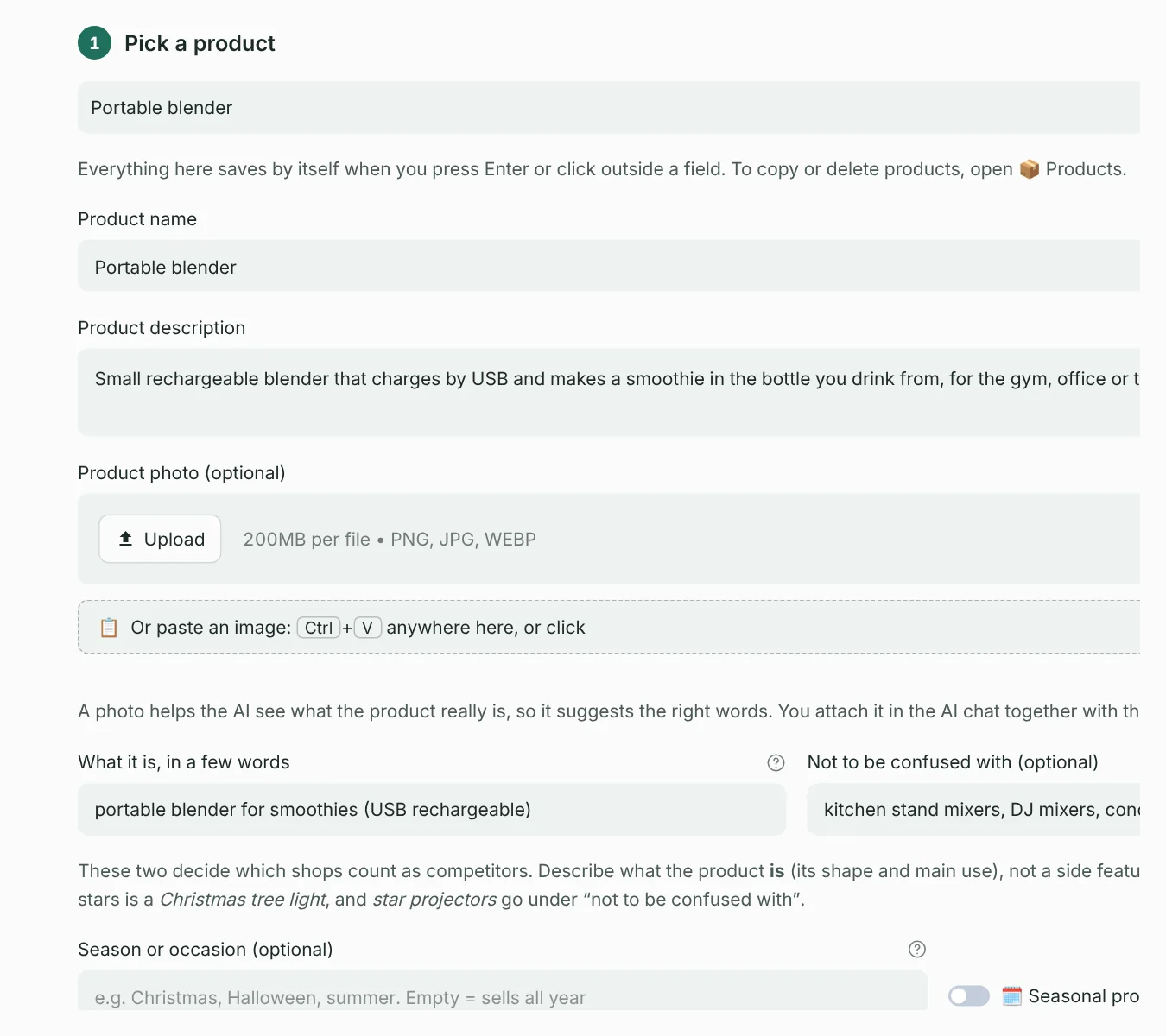
Choose a saved product from the list, or ➕ New product. Everything saves by itself when you press Enter or click outside a field.
| Field | What to write |
|---|---|
| Product name | Any name you'll recognise, e.g. “Pet hair remover”. Used in report titles. |
| Product description | What it does and who it's for, in at least one sentence. Needed for the AI suggestions. |
| Product photo (optional) | A clear photo, so the AI sees what the product really is. You attach it in the AI chat together with the prompt. |
| What it is, in a few words | The kind of product a competitor sells: “mini Christmas tree light”, “pet hair roller”. Name the product, not a side feature. |
| Not to be confused with (optional) | Look-alikes that share words but aren't yours: “video projectors, galaxy star projectors”. |
| Season or occasion (optional) | Christmas, Halloween, summer… Leave empty for products that sell all year. |
Seasonal products: switch on Seasonal product: count last 12 months. The check then also counts ads that ran in the past year and have stopped, so last season's sellers show up even out of season. Off: only ads running today count.
Step 2: Check the search words
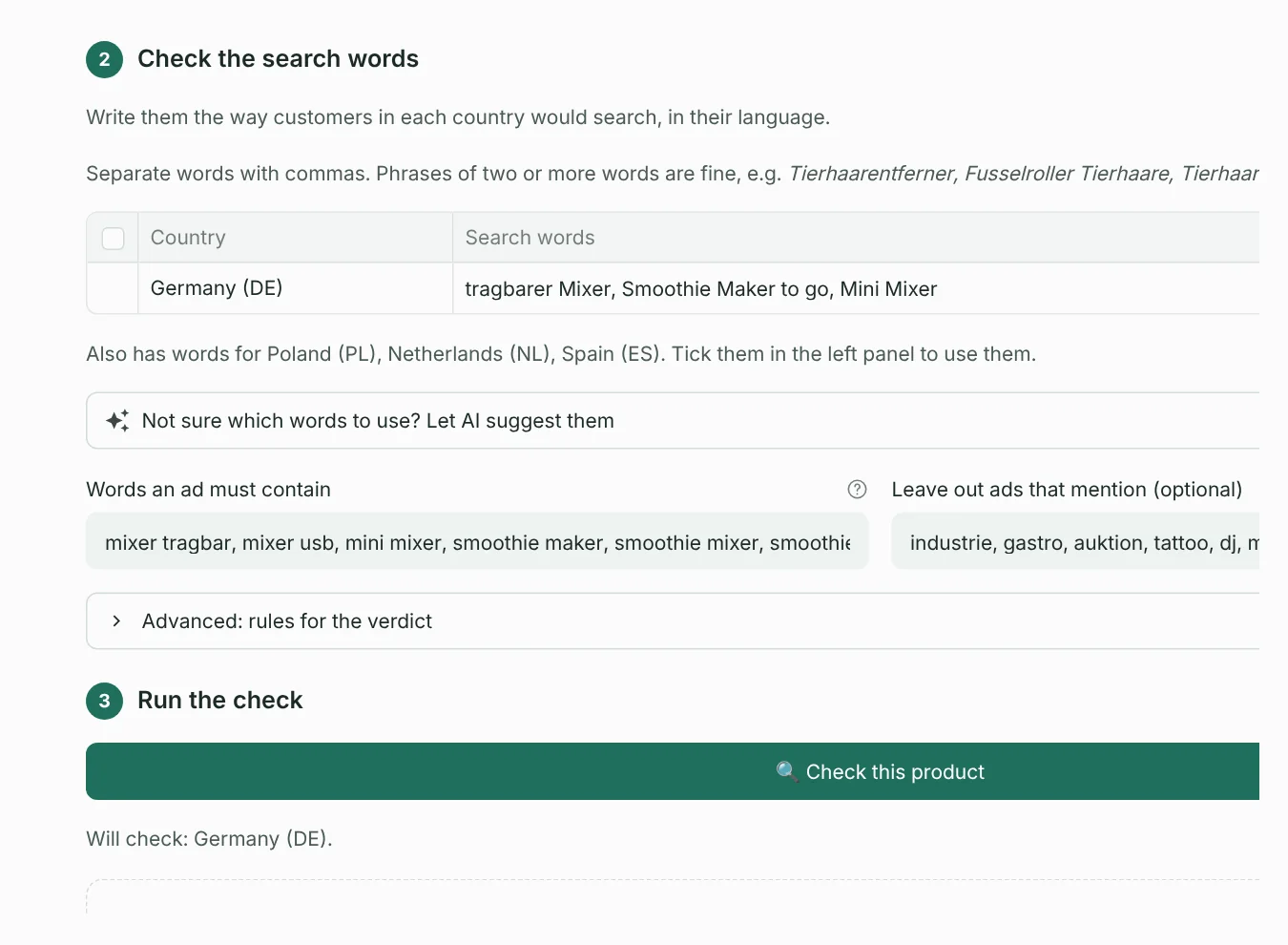
This step decides which ads count as competitors, so it matters most.
Search words, per country
Each country you picked in the left panel gets a row. Write what customers type in that country's language, separated by commas: Tierhaarentferner, Fusselroller Tierhaare for Germany, pet hair remover for the UK.
- Every word of a search must be in the ad. Use 1–3 words per search; long searches find almost nothing.
- Meta doesn't translate. German shops need German words.
- Compound words are separate words.
Weihnachtsbaumdoesn't findWeihnachtsbaumständer, so use the compounds shops actually write.
Let AI suggest the words
Not sure what people search for in Polish or Dutch? Open Not sure which words to use? Let AI suggest them:
- Make sure your countries are ticked in the left panel, and step 1 has a name and a description.
- Copy the prompt (copy icon in its top-right corner) and paste it into ChatGPT, Claude or Gemini. Attach the product photo if you added one.
- Paste the AI's whole answer into the box at the bottom and press ✨ Use these words.
SellProof fills the search words and the “must contain” words, and checks them: it warns you about words that are too generic, searches without a product word, or leave-out words that would remove your own product. You can still edit everything.
Words an ad must contain
An ad must contain one of these to count as being about your product. This removes unrelated ads that matched your search. Words match from their start: mixer finds “Mixer-Flasche” but not “Remixer”. Two words in one entry, like led maske, must both appear.
Leave out ads that mention
Ads with one of these words never count, even if they contain a must word. Use it for look-alikes: beamer when you check a Christmas tree light, e-roller when you check a face roller.
Step 3: Run the check
Press 🔍 Check this product. SellProof searches every country you picked and every search word, filters the ads, groups them by brand and looks inside the competitors' shops. It takes 1–3 minutes; a progress bar shows what it's doing.
Reading the result
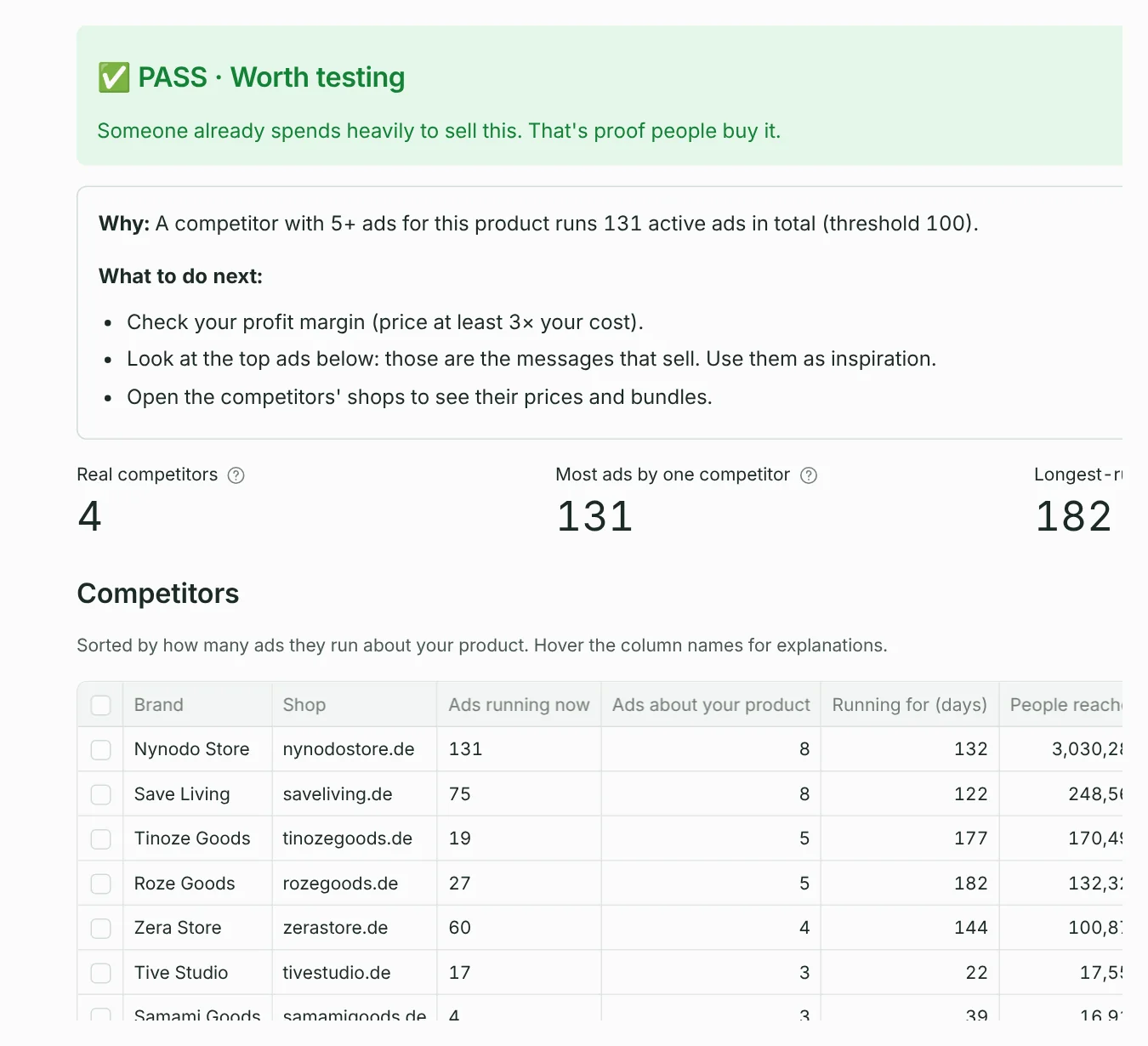
The verdict
| Verdict | What it means | Default rule |
|---|---|---|
| ✅ PASS · Worth testing | Someone already spends heavily to sell this. That's proof people buy it. | A real competitor runs 100+ ads in total. |
| 🤔 UNSURE · Maybe: look closer | People sell it, but nobody runs it at big scale yet. | Competitors exist, and an ad for it has run 30+ days or a competitor runs 20+ ads. |
| ⛔ FAIL · Not proven | Nobody advertises it seriously in your countries. Usually low demand. | No real competitor reaches those numbers. |
A real competitor is a brand with at least 5 ads about your product, so a big shop that mentions it once doesn't count. All these numbers are yours to change: open Advanced: rules for the verdict for this product, or set your defaults in Settings.
Under the verdict, Why gives the exact numbers behind it, and What to do next gives the next steps.
The competitors table
| Column | Meaning |
|---|---|
| Brand / Shop | The Facebook page running the ads, and the website they send people to. |
| Ads running now | All ads this brand runs now in your countries. 100+ means spending seriously; “300+” means at least 300. |
| Ads about your product | How many of their ads mention your product. |
| Running for (days) | How long their oldest ad about your product has been live. Long = profitable. |
| People reached | Meta's estimate of how many people in the EU saw their ads about your product. |
Hover (or tap) a column name for its explanation. Tick brands and press 👀 Watch to follow them in Watch competitors.
Their shops: competitors' prices
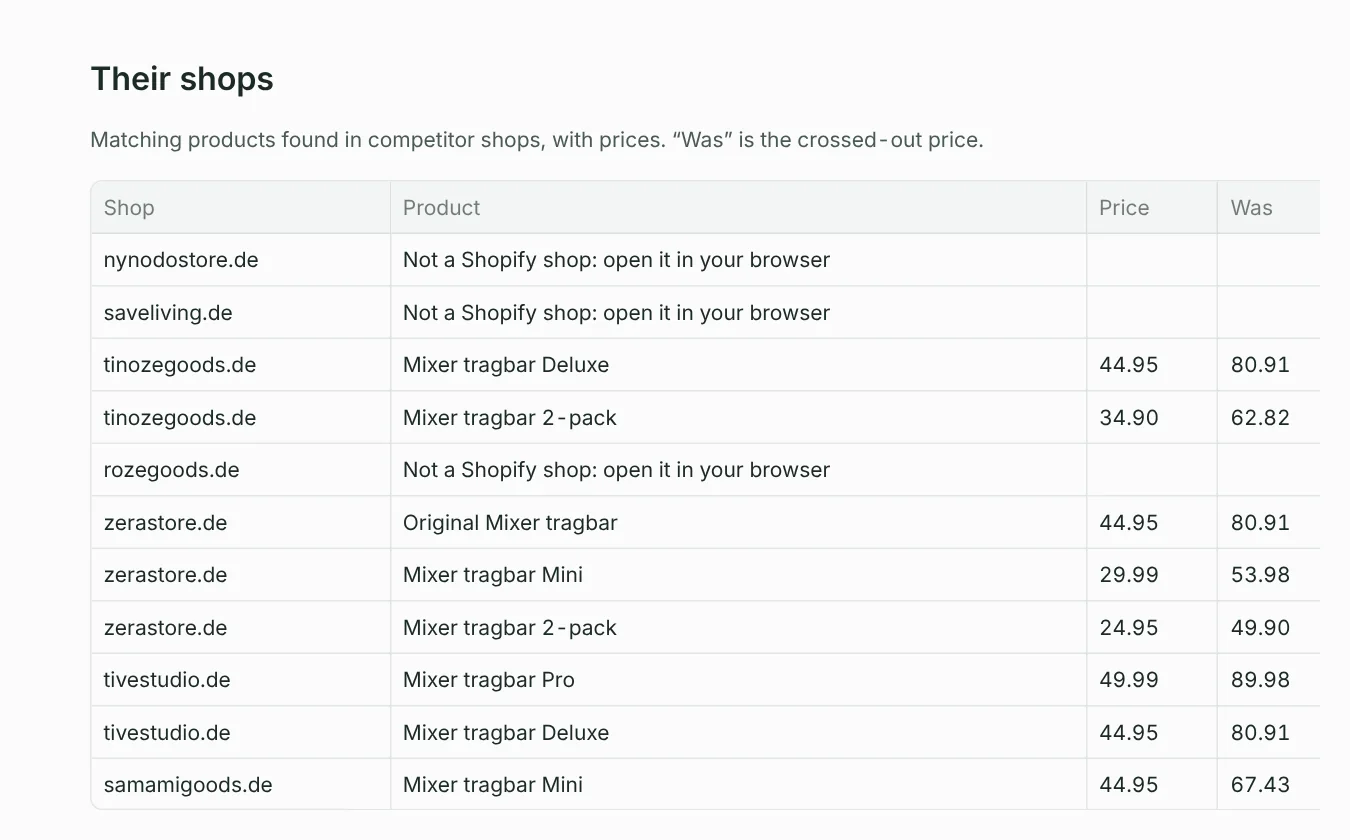
SellProof opens each competitor's shop and lists the products that match yours, with the price (a range if variants differ), the crossed-out was price, the options offered and since when they've sold it. This works for Shopify shops, which most dropshipping shops are; other shops are marked “not a Shopify shop: open it in your browser”. You can switch this off with Look inside competitor shops under Options in the left panel.
Best ads for this product
The ads that reached the most people. Click open ↗ to see the full ad in the Ad Library and use it as inspiration for your own.
Searches we ran
Open Searches we ran: what was counted and what was left out to see, per search, example ads that counted and ads that were left out. If a wrong kind of product counted, add a leave-out word; if your product was left out, add a must word. Then check again.
After the check
- Saved by itself: the product and its result appear in 📦 Products, and the report in 📁 Reports.
- Download the report as text (Markdown, for Obsidian or Notion), a web page (HTML) or a table (CSV, for Excel or Google Sheets).
- Same search twice today? SellProof reuses the first result, which is faster and saves Meta's hourly limit. Turn off Reuse today's results under Options to force fresh data.
Tips for good results
- FAIL but you expected PASS? Usually the search words are too narrow or in the wrong language. Try the AI suggestions, or broader words people really type.
- PASS that seems too easy? Open “Searches we ran”: generic must words like
ledorminilet unrelated ads count. - Check each market separately when they differ a lot: a product can PASS in Germany and FAIL in Spain.
- A verdict is a strong signal, not a guarantee. Check your margin (price at least 3× your cost) and the competitors' shops before you test.
Something unclear or missing? Write to support@setuplabco.com or use the contact form: we answer every message and improve these pages from your questions.