How to check if a product sells using the Meta Ad Library
Before you buy stock or spend on ads, you can see what your competitors are already paying for. Meta's Ad Library is free and public, and it shows which shops advertise a product, since when and in how many versions. This guide shows you how to read it, step by step.
Updated 30 October 2026 · About 8 minutes to read
1. Why ads tell you what sells
Shops don't keep paying for ads that lose money. When a shop runs ads for the same product for weeks, and adds new versions of those ads, it's very likely making money with it. You can't see a competitor's sales, but you can see how they spend on ads, and that's the next best thing.
The Meta Ad Library (facebook.com/ads/library) shows ads running on Facebook, Instagram, Messenger and Meta's partner apps. For ads shown in the EU it shows a lot more: stopped ads for a year, reach estimates and basic targeting. That's because of an EU law, which we explain in why only EU and UK ads are available.
2. Search the Ad Library the right way
- Pick one country where you want to sell. Results are per country, so you'll repeat this for each market.
- Set Ad category to All ads.
- Search with the words a shop would write in its ad, in that country's language. Search for
posture correctorin the UK,Haltungskorrektorin Germany andcorrecteur de posturein France. Meta doesn't translate your words.
How Meta's search works
Every word you type must appear in the ad, in any order. Long searches find almost nothing, so use 1–3 words. German and Dutch compound words count as one word: Weihnachtsbaum doesn't find Weihnachtsbaumständer.
Then filter to active ads and look at the date under each ad: "Started running on…". That date is the most useful thing on the page.
3. Keep only real competitors
Most results won't be about your product. Before you count anything, throw out:
- Look-alikes that share a word. "Roller" finds face rollers and scooters; "mixer" finds blenders and DJ mixers; "projector" finds both star lights and video beamers.
- Big retailers and marketplaces (Amazon, Temu, Zalando, supermarkets). They advertise everything, so their ads say nothing about your product.
- Shops selling something else for the same occasion. A search for a Christmas tree also finds tree stands, ornaments and lights.
For the rest, open the ad's link and check the shop really sells your product. Write down each real competitor and how many of its ads are about this product.
4. Read the signals
| What you see | What it usually means |
|---|---|
| Ads for the product running 30 days or more | The shop keeps paying for them: a strong sign it sells. |
| Many versions of the same ad ("X ads use this creative and text") | The shop is scaling: putting more money behind something that works. |
| Several different shops advertising it | Proven demand in that country. |
| A shop with hundreds of ads in total | A serious seller, not someone testing with pocket money. |
| Only a few ads, all a few days old | Others are still testing. No proof yet. |
| Ads that ran a week and stopped | Someone tested it and dropped it. Be careful. |
| Nobody advertises it | Either nobody has tried, or there's no demand. Riskier. |
Seasonal products (Christmas, Halloween, summer) need one more step: in EU countries, switch to active and inactive ads and look at last season. A product with no ads in October may have sold well last December.
5. Check their prices
Open the shops of your real competitors and note the price of the product. You'll learn two things: whether there's room for your margin after product cost, shipping and ads, and what price buyers in that country are used to. If competitors sell at €19 and your cost with shipping is €15, ads will eat the rest.
6. Decide: test it or skip it
Use a rule you can repeat, so you decide the same way every time, not on a hunch. A simple one:
Rule of thumb: test the product when at least one real competitor runs 5 or more ads for it, has 100+ ads in total, and some of its ads for the product have run for 30+ days.
That's a serious seller putting real money behind this product for a month. Make it stricter or looser as you learn what works for you.
If your markets pass, test with a small budget. If only one country passes, start there.
7. What the Ad Library can't tell you
- Sales numbers. Long-running ads are a strong hint, not proof. Some brands keep ads running for brand awareness.
- Exact spend. For product ads, Meta doesn't show how much was spent.
- Ads outside the EU and UK in full detail. For the US, the website shows only currently active ads, and tools using Meta's official API get no US product ads at all.
Doing this by hand takes hours. SellProof does it in one run.
Searching 28 countries in their own languages, throwing out look-alikes and big retailers, counting ads per competitor and checking their prices: SellProof does all of it through Meta's official API and gives you a clear verdict, PASS, UNSURE or FAIL, with the reasons. The rule above is its default, and you can change it.
See SellProofTry the free demo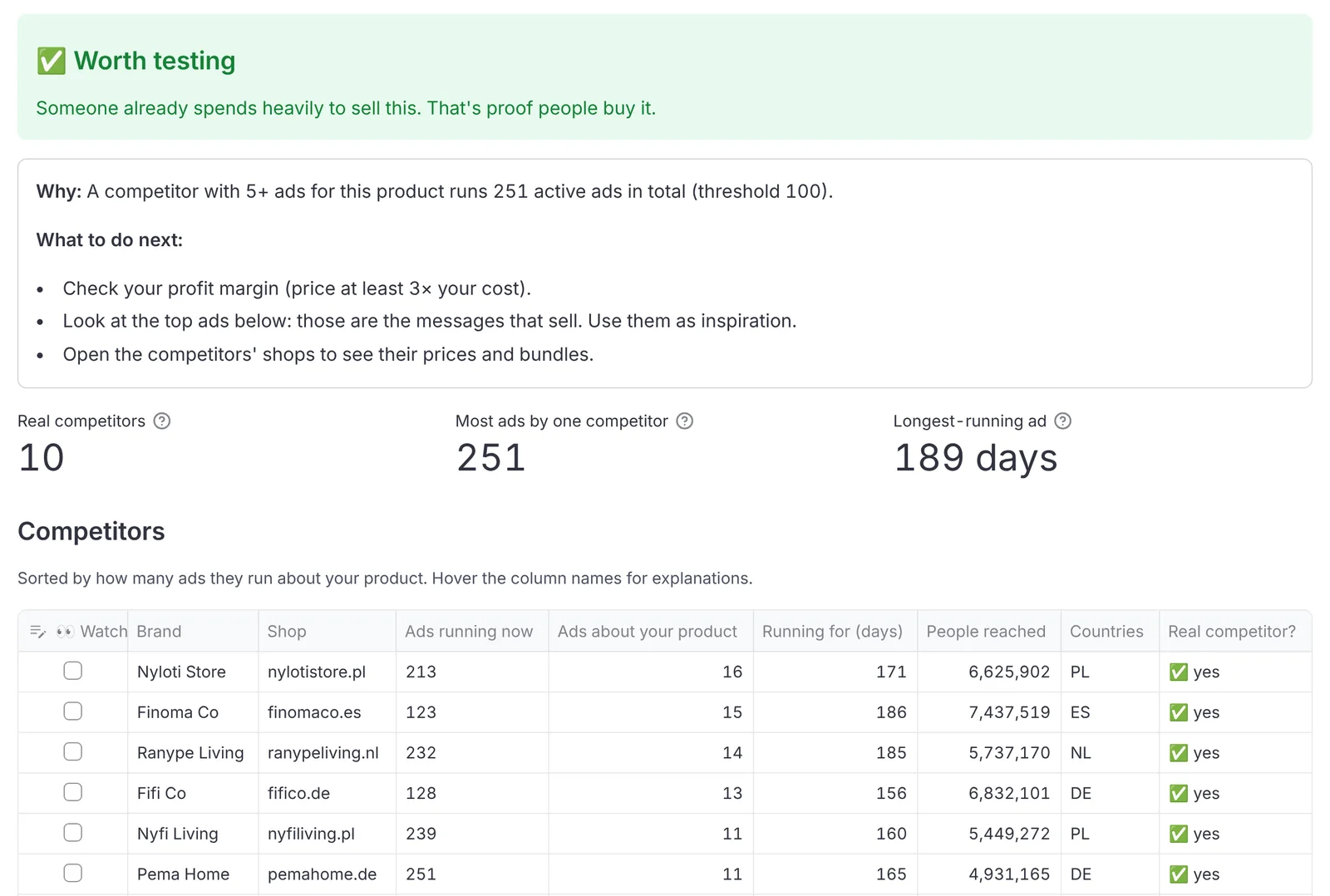
SellProof is made by SetupLab and is not affiliated with Meta. Facebook and Instagram are trademarks of Meta Platforms, Inc.